Cornerstone CSV Mapping Guide
Export the IDEXX Cornerstone Controlled Substance Log and map its columns to VetRx Ledger's import format — the most complete migration path of any major veterinary EMR.
Overview
IDEXX Cornerstone has a built-in Controlled Substance Log report that tracks dispensed and wasted quantities per event with lot numbers, expiry dates, and staff identifiers. This is the most complete data source of any major veterinary EMR and maps directly to VetRx Ledger with minimal transformation.
Step 1 — Export from Cornerstone
- Navigate to Reports → Inventory → Controlled Substance Log (or Reports → Compliance → DEA Log in Cornerstone 9.x+).
- Set the Date Range to your migration period.
- Set Clinic to a single site. If you manage multiple Cornerstone sites, run a separate export per clinic and do a separate import per VetRx Ledger clinic.
- Ensure the report includes these columns: Date, Doctor ID, Invoice #, Drug/Product, Lot Number, Expiry Date, Qty Dispensed, Qty Wasted, Staff ID, Comments.
- Click Export → CSV (or Print Preview → Export to Spreadsheet).
- Save the
.csvfile. Do not open in Excel before importing.
Step 2 — Column mapping
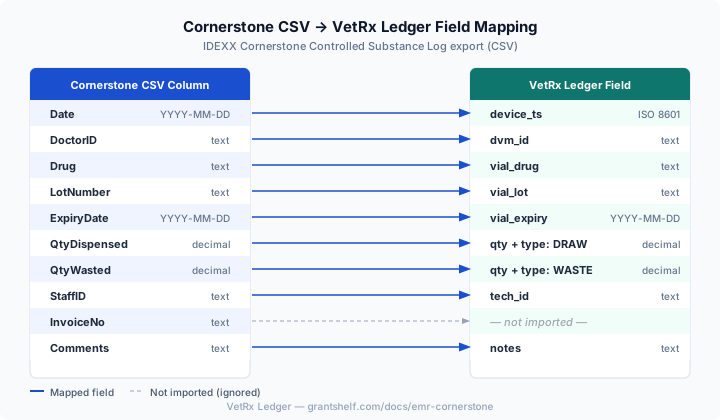
| Cornerstone Column | VetRx Ledger Field | Format | Notes |
|---|---|---|---|
Date | date | YYYY-MM-DD or MM/DD/YYYY | The Time column is ignored on import |
Product or Drug | drug | Free text | |
Qty Dispensed | qty (DRAW row) | Positive number | Create a separate DRAW row for this value |
Qty Wasted | qty (WASTE row) | Positive number | Create a separate WASTE row; omit if zero |
Doctor ID | dvm_id | String | Cornerstone doctor short-code |
Staff ID or Technician | tech_id | String | Cornerstone staff short-code |
Lot Number | lot | String | |
Expiration Date | expiry | MM/YYYY or YYYY-MM-DD | |
Comments | notes | Free text | |
Invoice # | (ignored) | — | Optionally include in notes for cross-reference |
Step 3 — Handle combined dispensed + wasted rows
Cornerstone exports one row per dispensing event with both Qty Dispensed and Qty Wasted as separate columns. VetRx Ledger requires these as two separate rows:
- One row with
type=DRAWandqty=the dispensed quantity. - One row with
type=WASTEandqty=the wasted quantity (skip this row if wasted quantity is 0 or blank).
You can do this transformation in a spreadsheet (create a second row per DRAW row where Qty Wasted > 0) or write a simple script. The import wizard's preview step shows you exactly what will be created before you commit.
Step 4 — Prepare and import the CSV
Target format:
date,type,drug,qty,dvm_id,tech_id,lot,expiry,notes
2024-02-10,DRAW,Butorphanol 10mg/mL,1.0,DR101,T-22,BT20240101,2025-01,Canine post-op
2024-02-10,WASTE,Butorphanol 10mg/mL,0.3,DR101,T-22,BT20240101,2025-01,Residual waste
2024-02-11,DRAW,Morphine Sulfate 15mg/mL,3.0,DR103,T-19,MS20230901,2024-09,
Navigate to /import, upload the file, complete the column-mapping step, and click Import.
Common issues
- Time column: Cornerstone includes a
Timecolumn alongsideDate. VetRx Ledger ignores it on import — date-only resolution is used. - Negative waste quantities: Some Cornerstone versions export waste as a negative number (e.g.
-0.3). Convert to positive — in VetRx Ledger, waste quantity is always expressed as a positive value withtype=WASTE. - Multi-site exports: If your export includes multiple clinics in one file, filter by the
SiteorLocationcolumn before importing. Run a separate import per VetRx Ledger clinic. - Schedule V items: Cornerstone may include Schedule V items in the Controlled Substance Log. VetRx Ledger accepts them; if you only want Schedule II–IV, filter those rows out before importing.
source: "csv_import" and cannot carry cryptographic dual-witness tokens. They serve as a historical baseline; all new events recorded directly in VetRx Ledger are fully signed and hash-chained.Column Mapping Diagram
The diagram below shows exactly how each Cornerstone CSV column maps to VetRx Ledger’s import schema. Columns shown with dashed arrows are read but not stored.
Download Sample CSV
Download this 15-row sample file to test the import wizard before migrating your live Cornerstone data. The sample uses realistic drug names, lot numbers, and column structure matching a Cornerstone 8.x / 9.x Controlled Substance Log export.
⬇ Download Cornerstone Sample CSV