ezyVet & Shepherd CSV Mapping Guide
Export dispensing records from ezyVet or Shepherd and map them to VetRx Ledger's CSV import format. Both systems use ISO 8601 dates which maps cleanly with no conversion needed.
Overview
ezyVet is a cloud-based practice management system widely used in corporate hospital networks. Shepherd is a newer cloud PMS popular with emergency and specialty practices. Both store dispensing records with batch/lot numbers and export clean CSV files — ezyVet uses ISO 8601 dates by default, so no date conversion is needed.
ezyVet — Export steps
- Go to Reporting → Clinical → Dispensing Records(or search "Dispensing" in the Reports search bar).
- Filter by Product Category: Controlled Substance, or by tag: Schedule II, Schedule III, etc. This avoids importing non-controlled items.
- Set the Date Range for your migration period.
- For multi-site organisations: select one site at a time, or include the
Sitecolumn and filter during import. - Click Export → CSV. ezyVet generates a download with all matching dispensing transactions.
ezyVet → VetRx Ledger column mapping
| ezyVet Column | VetRx Ledger Field | Format | Notes |
|---|---|---|---|
Date | date | YYYY-MM-DD | ISO 8601 — no conversion needed |
Product Name | drug | Free text | |
Batch Number | lot | String | ezyVet calls it "Batch"; maps to lot in VetRx |
Expiry Date | expiry | YYYY-MM-DD | |
Quantity | qty | Positive number | Strip unit suffix (e.g. "2.5 mL" → 2.5) |
Clinician or Vet | dvm_id | String | Use clinician code/initials for minimal PII |
Staff or Dispenser | tech_id | String | Use staff code/initials |
Notes | notes | Free text | Optional |
| (derive) | type | DRAW | Set to DRAW for dispensing records; add WASTE rows separately if needed |
ezyVet-specific considerations
- Batch vs Lot:ezyVet uses "Batch Number" for what VetRx Ledger calls
lot. They are the same field — just different naming conventions. - Quantity with unit suffix: ezyVet may export quantities as
2.5 mLrather than2.5. Strip the unit suffix before importing — VetRx Ledger stores the numeric value only, in whatever unit your vial was set up with. - WASTE events:ezyVet's dispensing records capture the dispensed amount. If waste was tracked (e.g. in a notes field or a separate "Waste" field), parse it out and add WASTE rows to the CSV before importing.
- Multi-site: ezyVet exports include a
SiteorLocationcolumn for multi-site organisations. Filter to one site per VetRx Ledger clinic import, or use the import wizard's row filter to select only rows matching a specific site.
ezyVet sample CSV
date,type,drug,qty,dvm_id,tech_id,lot,expiry,notes
2024-03-05,DRAW,Hydromorphone 2mg/mL,2.0,VET-ALT,DISP-JAM,BATCH20240115,2025-03-01,
2024-03-05,WASTE,Hydromorphone 2mg/mL,0.5,VET-ALT,DISP-JAM,BATCH20240115,2025-03-01,Residual
2024-03-06,DRAW,Ketamine 500mg/10mL,5.0,VET-BOS,DISP-KAR,BATCH20240220,2025-06-01,Equine procedure
Shepherd — Export steps
Shepherd's export workflow is similar to ezyVet. From the Shepherd dashboard:
- Navigate to Reports → Pharmacy → Controlled Substance Dispensing.
- Set the date range and filter by controlled substance category.
- Click Export CSV.
Shepherd → VetRx Ledger column mapping
Shepherd's column names differ slightly from ezyVet:
| Shepherd Column | VetRx Ledger Field | Notes |
|---|---|---|
Dispensed Date | date | Format: MM/DD/YYYY — convert to YYYY-MM-DD or use import wizard auto-detect |
Drug Name | drug | |
Lot Number | lot | Shepherd uses "Lot Number" (matches VetRx directly) |
Expiration Date | expiry | MM/DD/YYYY — convert if needed |
Amount Dispensed | qty | Positive number |
Prescribing Doctor | dvm_id | Use code/initials |
Dispensed By | tech_id | Use code/initials |
Notes | notes |
MM/DD/YYYY (e.g. 03/05/2024). The VetRx Ledger import wizard auto-detects this format, or you can convert with a text editor Find/Replace before uploading.Common issues (both EMRs)
- Unit suffix on quantity: Strip any text suffix (
mL,mg,units) — VetRx Ledger expects a plain number. - Multi-site exports: Filter or split by site before importing into the matching VetRx Ledger clinic.
- Duplicate rows: If the export contains both a dispensing record and a separate waste record for the same event, import both — VetRx Ledger will correctly subtract both from the running balance.
source: "csv_import" and cannot carry cryptographic dual-witness tokens. They serve as a historical baseline; all new events recorded directly in VetRx Ledger are fully signed and hash-chained.Column Mapping Diagram
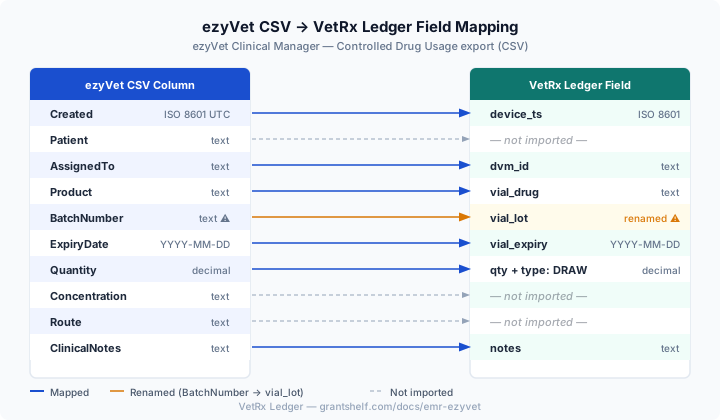
The diagram below shows how each ezyVet column maps to VetRx Ledger. Orange arrows indicate columns that require renaming (BatchNumber → vial_lot). Dashed arrows indicate columns that are read but not stored.
Download Sample CSV
Download this 15-row sample file to test the import wizard before migrating your live ezyVet data. The sample uses ezyVet’s ISO 8601 timestamp format and BatchNumber column naming.
⬇ Download ezyVet Sample CSV